
Phone Number QR Code Scanning: The Future of Contactless Communication
Discover how phone number QR codes revolutionize contactless communication. Learn how to generate, use, and benefit from QR codes that instantly dial phone numbers with a simple scan.
Established
Worldwide
Rating
Phone Number QR Code Scanning: The Future of Contactless Communication
Introduction to Phone Number QR Codes
In today's fast-paced digital world, QR codes have become an essential tool for seamless communication. Phone number QR codes take this convenience to the next level by allowing users to instantly call a number with just a scan. No more typing, no more errors—just point, scan, and connect.
What is a Phone Number QR Code?
A phone number QR code is a scannable barcode that contains a phone number in a special format (tel: link). When scanned with a smartphone camera or QR code reader, it automatically opens the phone's dialer app with the number ready to call. This eliminates the need to manually enter phone numbers, reducing errors and saving time.
Benefits of Phone Number QR Codes
1. Instant Connectivity
With a simple scan, users can immediately call your number without typing. This is especially useful for businesses, customer service, and emergency contacts.
2. Error-Free Dialing
Manual entry of phone numbers often leads to mistakes. QR codes eliminate this risk by automatically populating the correct number.
3. Professional Appearance
QR codes add a modern, tech-savvy touch to business cards, flyers, posters, and marketing materials.
4. Contactless Solution
In a post-pandemic world, contactless solutions are preferred. QR codes allow customers to connect without physical contact or shared surfaces.
5. Trackable Analytics
Some QR code services provide analytics, allowing you to track how many times your QR code has been scanned.
How to Generate a Phone Number QR Code
Creating a phone number QR code is simple with Smart QR Shop:
- Visit our phone QR code generator
- Enter your phone number (with or without country code)
- Optionally add a name or label
- Generate your QR code
- Download and use it on your materials
Try Phone QR Code Generator Now →
Best Practices for Phone Number QR Codes
1. Include Country Code
For international accessibility, always include the country code (e.g., +1 for USA, +91 for India).
2. Test Before Distribution
Always test your QR code with multiple devices and QR code readers to ensure compatibility.
3. High-Quality Printing
Ensure your QR code is printed clearly and at an appropriate size (minimum 2cm x 2cm) for easy scanning.
4. Clear Instructions
Include simple instructions like "Scan to call" near your QR code to guide users.
5. Strategic Placement
Place QR codes in easily accessible locations where users can comfortably scan them.
Use Cases for Phone Number QR Codes
Business Applications
- Business Cards: Add QR codes to business cards for instant contact
- Restaurant Menus: Allow customers to call for reservations or orders
- Real Estate: Enable potential buyers to contact agents instantly
- Customer Service: Provide quick access to support lines
Personal Applications
- Event Invitations: Include RSVP contact numbers
- Wedding Cards: Easy contact for guests
- Personal Cards: Modern way to share contact information
Technical Details
Phone number QR codes use the tel: URI scheme, which is supported by all modern smartphones. The format is: tel:+1234567890 When scanned, this automatically opens the phone dialer with the number pre-filled, ready to call.
Conclusion
Phone number QR codes represent the future of contactless communication. They combine convenience, professionalism, and modern technology to create seamless connections between businesses and customers. Whether you're a business owner looking to improve customer experience or an individual wanting to share contact information easily, phone number QR codes are an invaluable tool.
Start creating your phone number QR code today with Smart QR Shop and experience the convenience of instant, error-free communication!
Recent Blogs
व्हाट्सएप हैक: कारण, तुरंत समाधान और सुरक्षा — स्टेप-बाय-स्टेप गाइड
यह पोस्ट बताएगी कि WhatsApp हैक के सामान्य कारण क्या हैं, कैसे तुरंत अकाउंट रिकवर करें, चैट में ऑटो-मीडिया डाउनलोड को बं...
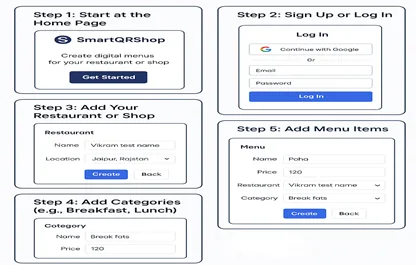
How to Create a Restaurant or Shop Menu on SmartQRShop
Learn how to set up your restaurant or shop and create a digital menu using SmartQRShop in just a few steps.
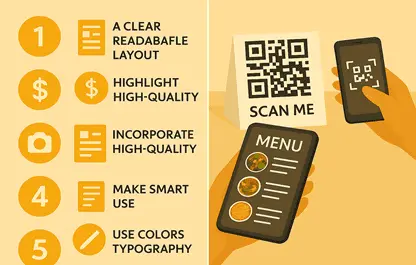
Top 5 Design Tips for Creating an Attractive Restaurant Menu
Learn the top 5 practical and proven design strategies to make your restaurant menu more engaging, on-brand, and convers...